网络工程师案例分析当天每日一练试题地址:www.cnitpm.com/exam/ExamDayAL.aspx?t1=8
往期网络工程师每日一练试题汇总:www.cnitpm.com/class/27/e8_1.html
网络工程师案例分析每日一练试题(2026/6/10)在线测试:www.cnitpm.com/exam/ExamDayAL.aspx?t1=8&day=2026/6/10
点击查看:更多网络工程师习题与指导
网络工程师案例分析每日一练试题内容(2026/6/10)
试题四(共15分)
阅读以下说明,回答问题1至问题2,将解答填入答题纸对应的解答栏内。
【说明】
某公司的网络拓扑结构如图4-1所示。
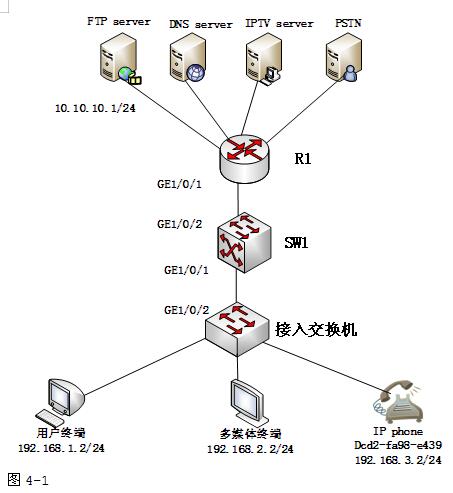
公司管理员对各业务使用的VLAN作如下规划:

为了便于统一管理,避免手工配置,管理员希望各种终端均能够自动获取IP地址,语音终端根据其MAC地址为其分配固定的IP地址,同时还需要到FTP服务器10.10.10.1上动态获取启动配置文件configuartion.ini,公司DNS服务器地址为10.10.10.2,所有地址段均路由可达。
【问题1】(3分)
公司拥有多种业务,例如Internet、IPTV、VoIP等,不同业务使用不同的IP地址段。为了便于管理,需要根据业务类型对用户进行管理。以便路由器R1能通过不同的VLAN分流不同的业务。
VLAN划分可基于(1)、子网、(2)、协议和策略等多种方法。
本例可采用基于(3)的方法划分VLAN子网。
【问题2】(12分)
下面是在SW1上创建DHCP Option模板,并在DHCP Option模板视图下,配置需要为语音客户端IP Phone分配的启动配置文件和获取启动配置文件的文件服务器地址,请将配置代码或注释补充完整。
(4)
[HUAWEI] sysname SW1
[SW1](5)option template template1
[SW1-dhcp-option-template-template1] gateway-list(6)//配置网关地址
[SW1-dhcp-option-template-template1] bootfile(7)//获取配置文件
[SW1-dhcp-option-template-template1] next-server(8)//配置获取配置文件地址
[SW1-dhcp-option-template-template1] quit
下面创建地址池,同时为IP Phone 分配固定IP地址以及配置信息。请将配置代码补充完整。
[SW1]ip pool pool3
[SW1-ip-pool-pool3] network(9)mask 255.255.255.0
[SW1-ip-pool-pool3] dns-list(10)
[SW1-ip-pool-pool3] (11)192.168.3.1
[SW1-ip-pool-pool3] excluded-ip-address (12) 192.168.3.254
[SW1-ip-pool-pool3] lease unlimited
[SW1-ip-pool-pool3] static-bind ip-address 192 168.3.2 mac-address (13) option-templale template1 //使用模板
[SW1-ip-pool-pool3] quit
#在对应VLAN上使能DHCP
[SW1] interface vlanif (14)
[SW1-Vlanif300] (15) select global
[SW1-Vlanif300] quit
信管网试题答案与解析:www.cnitpm.com/exam/ExamDayAL.aspx?t1=8&day=2026/6/10
信管网考友试题答案分享:
信管网user************:
mac地址
网络层接口
mac地址4.system
5.inteface
9.192.168.3.1
10.
11.network
12.192.168.3.250-254
13.
14.300
15.enable
信管网user************:
(1)接口<br>(2)mac地址<br>(3)子网<br>(4)system-view<br>(5)dhcp<br>(6)192.168.3.2<br>(7)10.10.10.1<br>(8)10.10.10.1<br>(9)192.168.3.0<br>(10)10.10.10.2<br>(11)gateway-list<br>(12)192.168.3.2 192.168.254<br>(13)dcd2-fa98-e439<br>(14)300<br>(15)dhcp
信管网cnit**************:
端口 mac地址 子网system-view
name
192.168.3.1
configuartion.ini
10.10.10.1
192.168.3.0
10.10.10.1
gateway-list
192.168.3.1
dcd2-fa98-e439
300
dhcp
信管网user************:
端口
mav
子网system-view
enter
192.168.1.1
catch
catch
pool3
all
ip address
信管网cnit**************:
(1)端口 (2)mac地址 (3)子网(5)dhcp (6)192.168.3.1 (9)192.168.3.0 (10)10.10.10.2 (11)gateway-list (12)192.168.3.1 (14)300 (15)dhcp
信管网试题答案与解析:
www.cnitpm.com/exam/ExamDayAL.aspx?t1=8&day=2026/6/10


 网络工程师
网络工程师  导航
导航